Posts

"Tutorial" : How To Downloading from ShareCash, FileIce, By using Sandboxie Only Using 7 Step
Image
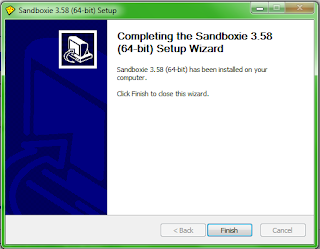
For all the people who have trouble with the surveys on ShareCash, here's a way to download that works for me almost every time. This may or may not work on other survey sites. What you'll need: Step 1 : .hotspotshield download here Step 2 :.Sandboxie: download here Download and install Sandboxie. After installation, the Sandboxie window should come up. Close any prompts that may come up, right click 'Sandbox DefaultBox', and select 'Run Sandboxed>Run Web Browser'. A new window with your default browser will come up. If Firefox gives you an error 'Firefox is already running, but is not responding. To open a new window, you must first close the existing Firefox process, or restart your system.', just try opening it through Sandboxie again and it should work. You can tell that Firefox is running sandboxed when you see a pair of '[#]' around the window name in your taskbar. Step 3: Copy and paste your link into the Sandboxed browser....

How To Delete an “UnDeletable” File

Image
Hello Friends, this Tutorial is for all those who want to delete some files but they cannot delete them due to some reasons. Well this is a Full Proof way of deleting any Damn File. After Deleting the File in this way there won’t be any trace of that File on your computer. Beware : Make sure that the file you are Deleting is not a System File. Method  one Open a Command Prompt window and leave it open.   Close all open programs.   Click Start, Run and enter TASKMGR.EXE   Go to the Processes tab and End Process on Explorer.exe.   Leave Task Manager open.   Go back to the Command Prompt window and change to the directory the AVI (or other undeletable file) is located in.   At the command prompt type DEL where is the file you wish to delete.   Go back to Task Manager, click File, New Task and enter EXPLORER.EXE to restart the GUI shell.   Close Task Manager. Or   ...

Enjoy 60 minutes trial of free calling to 60 countries.For Android Only.

Image
For Android Only. https://play.google.com/store/apps/detai…et.voxcorp http://www.voxcorp.net/ dont forget to note down the password when it displays on your phone Description Enjoy 60 minutes trial of free calling to 60 countries,and unlimited SIP/VoIP calling and instant messaging to other VoX Mobile customers from anywhere in the world over 3G/4G and Wi-Fi networks. Here is what you get:  60 minutes of FREE calling to select countries  No monthly contract  A real telephone number (1)  Unlimited free calls to other VoX Mobile customers (2)  Unlimited free instant messaging to other VoX Mobile customers (2)  Free voice mail (1)  Free calling features such as call waiting, 3-way calling, and caller ID  Record telephone calls  Incoming call filtering for advanced users  Integrated contacts  Integrated dial pad  Support for multiple accounts  Support for multiple telephone numbers  Su...

Google SEO Search Engine Optimization Starter Guide

Image
In simple words Search engine optimization ( SEO ) is the process of improving the visibility of a web site or a web page in search engines.This process is very important when you want to get lot of traffic from search engines like google ,yahoo,bing etc. Search engine optimization includes what are the factor on which a website ranking is depend during search engine searching.If you don’t know from where to start about seo ,there is a Search Engine Optimization Starter Guide from google which will help you to create your website or blogs search engine friendly. This guide includes all the basics of seo for beginner.It is an official Google SEO Starter Guide so it includes most of the seo concept.This new version of seo guide have the “SEO for Mobile Phones” section where Google helps you understand why having a mobile version of your site is  important and how you can  implement SEO for it. Click below and download the google Search Engine Optimization ...

6 Awesome Open Source USB Applications

If you find yourself on the go more often than not and having to use public computers such as those in an Internet cafe or library, you've probably adjusted to using whatever browser and programs are available on the computer. However, you can custom tailor programs to your own preferences using a USB drive and these programs will retain your preferences no matter what computer the drive is plugged into. Check out these top six applications to custom tailor your user experience no matter what computer you use. Firefox Portable: One of the worst things about having to use someone else's browser is it is not configured the way you want it. With Firefox portable, you can install Firefox on your USB drive and configure it with all the add-ons and extensions you want so your browsing experience never changes. Download: http://portableapps.com/apps/internet/firefox_portable Thunderbird Portable: The second annoyance of having to use someone else's computer is not...

Hot Deals – Online → Free domain (including .com) at intuit – No Credit Card Required (Giveaway)

This is a freebie but this may have got ignored if posted in Freebies Section http://www.intuit.com/websites/free-we…e/ When they ask for Credit Card details, use Entropay Virtual Card. For activation of Virtual card you need to provide funding source. For that select BankAccount → Random country → Others → Any Bank name Free website with domain for 1 year. It seems this is also sponsored by Google ( http://www.google.com/intl/en/press/pressrel/go…  ). Edit 1. Advanced DNS settings (A, CNAME and MX records) available if site hosted with them (free). 2. Nameservers can be changed 3. Advanced DNS settings get deactivated when NS is changed. But advanced DNS settings can be modified from website host cPanel

Enabiling Cmd + Regedit When It's Disabled By Admin / Group Policy

CMD: Step 1: Create a new shortcut Step 2: Add the following to the shortcut: REG add HKCU\Software\Policies\Microsoft\Windows\System /v DisableCMD /t REG_DWORD /d 0 /f Regedit: Step 1: Create shortcut Step 2: Add the following to the shortcut: REG add HKCU\Software\Microsoft\Windows\CurrentVersion\Policies\System /v DisableRegistryTools /t REG_DWORD /d 0 /f Back register keys b4 u try this